Lost a word? Get it back.
On calls in English, Slotscoop gives you 2–3 words under your camera, or one in your headphones.
“Let’s keep the… hmm… what’s the word…” Slotscoop shows three words: momentum, pace, energy. “Momentum” fills the gap.
Coming soon for Mac
Free for 7 days. No card, no account.
Download for MacFree for 7 days. No card, no account.
Two ways back to the word.
 In your headphones
The whisper
Say it in your language.
Hear it in English, in your headphones. See it under your camera too.

Hints
Or stop mid-sentence.
See 2–3 words under your camera, for a moment.
Need them now? Press Control-Option-H.
Languages
Think in your language.
Say the word in one of these, and hear it in English.
- Spanish
- Portuguese
- French
- German
- Italian
- Russian
Think in another language? The hints under your camera still work: they’re English words.
Slotscoop wakes up by itself when a call starts, and stays quiet until you need it. When it hears the others too, its words fit the call.
Works with Zoom, Google Meet, Microsoft Teams, Slack and other call apps.
Your words, not a script.
Slotscoop gives you one word, or 2–3 separate words: never a sentence, never an answer. When it isn’t sure, it stays quiet unless you ask.
One word
momentum
Never a sentence
We should maintain the positive momentum we have built.
For client calls, stand-ups, sales calls, negotiations and presentations. When not to use it


Slotscoop keeps the words it gave you in Your words, a list on your Mac. Say one yourself twice, without help, and it’s marked Learned. Their phrases are one switch away.
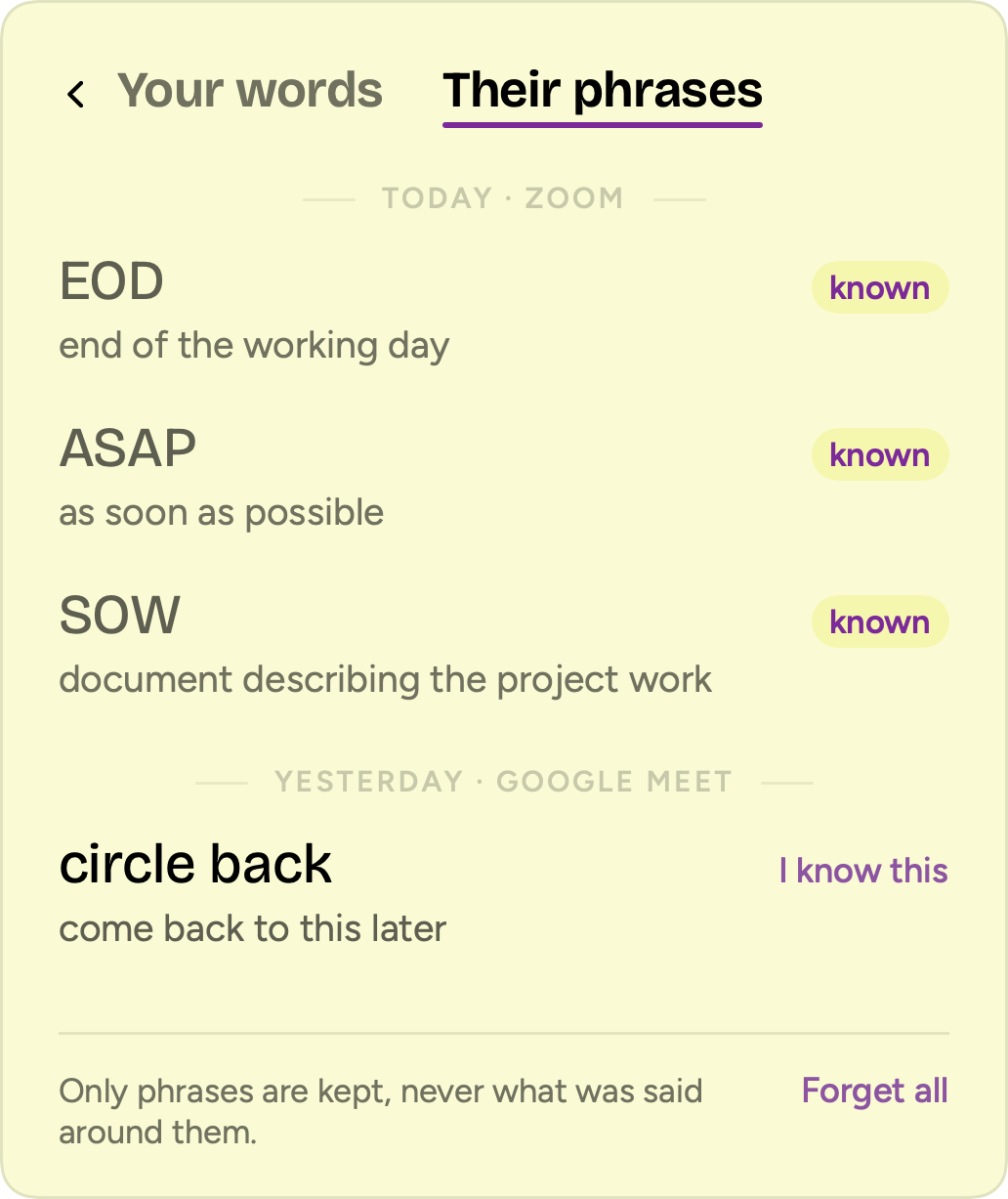
Slotscoop keeps the phrases it explained on calls in Their phrases, a list on your Mac, with what each one means. Mark one “I know this”, and it’s known: it won’t be explained again.
Their phrases, explained.
On calls, people say things like “circle back” or “by EOD”. Slotscoop explains them under your camera, so you can nod and mean it.
Let’s circle back on that by EOD.

In the app, in your language or plain English
Understanding
Your own word comes first, and the pill goes when you speak. The explanations were written and checked ahead of time, never made up during the call.
Heard on your Mac.
Sent nowhere.
Nothing you say leaves your Mac.
Many tools for calls send your voice to a server. Slotscoop has no server for your voice. It brings its own ears and brain, and they live on your Mac.
- No account.
- No recordings.
- No saved transcripts.
The part that listens has no internet access. macOS blocks it. After you install Slotscoop, check it yourself in Terminal:
codesign -d --entitlements - /Applications/Slotscoop.app
You’ll see the sandbox and the microphone. No network.
Separate helpers go online to download what Slotscoop needs and to check your license. They can’t hear you.
7 days free. Then you decide.
No card, no account. When the trial ends, nothing is charged.
Coming soon for Mac
Download for MacSlotscoop Pro
Yearly Save 45% vs. Monthly
$4.92a month
$59 billed yearly
Monthly
$9a month
Billed monthly
Cancel anytime · Prices include tax
Renews automatically until you cancel · Terms
After you pay, you get a key to paste into Slotscoop. Save it: it isn’t emailed.
Changed your mind? Ask for a full refund within 14 days of your first payment.
One subscription covers up to 3 of your Macs.
Mac with Apple silicon (M1 or later) · 8 GB of memory, 16 GB recommended · macOS 15 Sequoia or later
Fair questions.
Does it listen to my calls?
Yes, during calls. It hears you, and the other side too if you allow it, so its words fit the call and it can explain their phrases. It makes no recordings and saves no transcripts, and nothing you say leaves your Mac. The part that listens has no internet access: macOS blocks it, and you can check that in Terminal.
Is this allowed?
It’s for your own speech: one word at a time, never sentences or answers. Don’t use it where outside help isn’t allowed, like exams and tests. Some workplaces and clients have rules about software that listens to calls, so check them first.
What does it keep from my calls?
Only the words it gave you, the phrases it explained, and the ones you marked “I know this” or said yourself. Never what anyone said around them. You can turn the journal off, or forget Your words or Their phrases with one click.
What does it cost, and what happens after the trial?
The first 7 days are free, with no card and no account. Then it’s $59 a year ($4.92 a month) or $9 month to month, tax included, and you can cancel anytime. If you don’t buy, Slotscoop stays quiet on calls after the trial. Nothing is charged, and your words and settings stay.
Does it work with my call app?
Yes: Zoom, Google Meet, Microsoft Teams, Slack and other call apps. It wakes up by itself when a call starts. For a call in any other app, start it from the menu bar.
Does it work with my language?
You can say the word in Spanish, Portuguese, French, German, Italian or Russian, on calls in English. If you think in another language, the hints under your camera still work: they’re English words.
Will the others hear it?
Not the whisper: it plays only in your headphones, and without them the word shows under your camera instead. The others do hear a word you say in your language. If you don’t want that, stop mid-sentence: 2–3 English words appear under your camera.
Does it work on an Intel Mac?
No. Slotscoop needs a Mac with Apple silicon (M1 or later), 8 GB of memory (16 GB recommended) and macOS 15 Sequoia or later.
Anything else? Write to support@slotscoop.com.

Your words.
Just without the pauses.
Try it on your next call.
Coming soon for Mac
Free for 7 days. No card, no account.
Download for MacFree for 7 days. No card, no account.
Mac with Apple silicon (M1 or later) · 8 GB of memory, 16 GB recommended · macOS 15 Sequoia or later